Scrapy 适合抓取直接包含目标数据的 HTML 页面。如果数据要等浏览器执行 JavaScript,或滚动、点击后才出现,先检查页面是否调用了数据接口;没有可直接请求的接口时,再考虑 Selenium 或 Playwright。
Scrapy 的请求流程
先看请求和数据怎样在各组件之间流转。下面这张流程图来自腾讯云开发者社区:
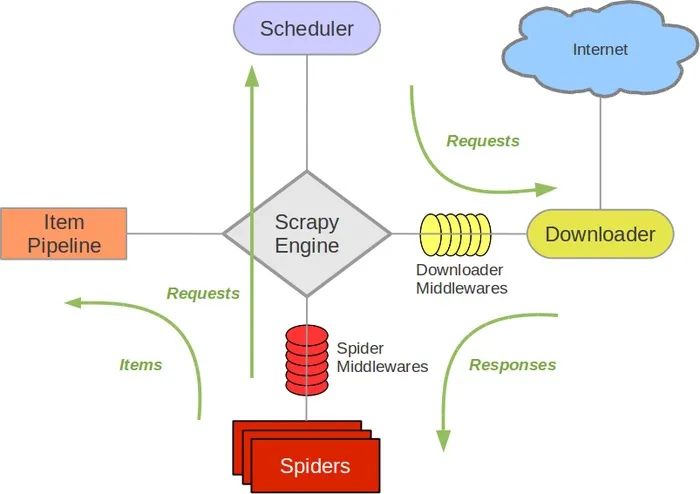
基本流程是:
1
| Spider 产生请求 -> Engine 调度 -> Downloader 下载页面 -> Spider 解析响应 -> Pipeline 处理数据
|
入门时主要写两块:
spider:页面从哪里进来,数据怎么取,下一页怎么跟;pipeline:取出来的数据要不要清洗、去重、保存。
请求调度、下载、请求去重和并发控制由 Scrapy 负责;需要持续抓取、翻页和处理数据时,不必再围绕 requests.get() 自己拼这些环节。
创建项目
建议先用熟悉的工具创建并激活虚拟环境;我通常用 uv。然后安装 Scrapy:
创建项目:
1
2
| scrapy startproject quote_spider
cd quote_spider
|
创建完成后,目录大概是这样:
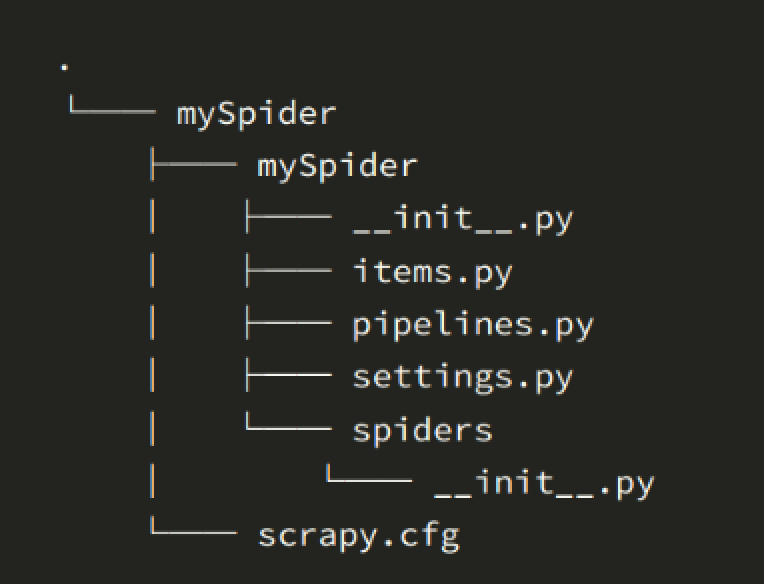
常用文件先记这几个:
1
2
3
4
5
| quote_spider/
items.py # 定义数据字段
pipelines.py # 清洗、保存数据
settings.py # 并发、下载延迟、管道开关等配置
spiders/ # 放具体爬虫
|
用 shell 先试页面
写 spider 前,先在 Scrapy shell 里试 CSS 或 XPath 选择器,确认它们能从实际响应中取到数据:
1
| scrapy shell https://quotes.toscrape.com/
|
进去后先试:
1
| response.css("div.quote").get()
|
能拿到一段 HTML,说明页面内容在服务端返回的 HTML 里,Scrapy 可以直接抓。
再取第一条 quote:
1
2
3
4
| quote = response.css("div.quote")[0]
quote.css("span.text::text").get()
quote.css("small.author::text").get()
quote.css("div.tags a.tag::text").getall()
|
这里最常用的就三个写法:
1
2
3
| ::text 取文本
::attr(href) 取属性
.getall() 取全部结果
|
如果取不到数据,先检查响应内容和选择器,不要直接在 spider 里反复试。
第一个 spider
在 quote_spider/spiders/quotes.py 新建文件:
1
2
3
4
5
6
7
8
9
10
11
12
13
14
15
16
17
| import scrapy
class QuotesSpider(scrapy.Spider):
name = "quotes"
allowed_domains = ["quotes.toscrape.com"]
async def start(self):
yield scrapy.Request("https://quotes.toscrape.com/", self.parse)
def parse(self, response):
for quote in response.css("div.quote"):
yield {
"text": quote.css("span.text::text").get(),
"author": quote.css("small.author::text").get(),
"tags": quote.css("div.tags a.tag::text").getall(),
}
|
运行:
终端里能看到 quote 数据,就说明抓取和解析跑通了。
网上很多旧教程会写:
1
| start_urls = ["https://quotes.toscrape.com/"]
|
start_urls 在简单项目里仍能用。这里采用新版官方教程中的 async def start(),以后要调整入口请求时可以直接修改这个方法。
保存成文件
先别急着写数据库。入门阶段最适合先导出 JSONL:
1
| scrapy crawl quotes -O quotes.jsonl
|
-O 是覆盖输出,-o 是追加输出。开发调试时我更喜欢 -O,不容易把旧数据混进去。
JSONL 的好处是每行一条数据:
1
| {"text": "The world as we have created it...", "author": "Albert Einstein", "tags": ["change", "deep-thoughts", "thinking", "world"]}
|
后面要导入 MySQL、MongoDB,或者丢给脚本二次处理,都方便。
把下一页也跟上
先在 shell 里看下一页链接:
1
| response.css("li.next a::attr(href)").get()
|
返回的是:
改 spider:
1
2
3
4
5
6
7
8
9
10
11
12
13
14
15
16
17
18
19
20
21
| import scrapy
class QuotesSpider(scrapy.Spider):
name = "quotes"
allowed_domains = ["quotes.toscrape.com"]
async def start(self):
yield scrapy.Request("https://quotes.toscrape.com/", self.parse)
def parse(self, response):
for quote in response.css("div.quote"):
yield {
"text": quote.css("span.text::text").get(),
"author": quote.css("small.author::text").get(),
"tags": quote.css("div.tags a.tag::text").getall(),
}
next_page = response.css("li.next a::attr(href)").get()
if next_page:
yield response.follow(next_page, callback=self.parse)
|
这里用 response.follow(),别自己拼域名。它会把 /page/2/ 转成完整 URL,并交给 Scrapy 调度。
再次运行:
1
| scrapy crawl quotes -O quotes.jsonl
|
看到日志里出现 /page/2/、/page/3/,说明翻页已经跑起来了。
什么时候需要 Item
前面直接 yield dict 没问题。项目小的时候,这样最快。
但如果字段多了,建议在 items.py 里写清楚:
1
2
3
4
5
6
7
| import scrapy
class QuoteItem(scrapy.Item):
text = scrapy.Field()
author = scrapy.Field()
tags = scrapy.Field()
|
spider 里改成:
1
2
3
4
5
6
7
8
9
10
| from quote_spider.items import QuoteItem
def parse(self, response):
for quote in response.css("div.quote"):
yield QuoteItem(
text=quote.css("span.text::text").get(),
author=quote.css("small.author::text").get(),
tags=quote.css("div.tags a.tag::text").getall(),
)
|
Item 把字段集中定义在一处。后面加 Pipeline 或保存到数据库时,更容易检查字段名。
Pipeline 放清洗逻辑
Spider 里别塞太多处理逻辑。Spider 负责抓,Pipeline 负责处理。
比如去掉 quote 两边的中文引号,顺手清一下空标签:
1
2
3
4
5
6
| class CleanQuotePipeline:
def process_item(self, item, spider):
item["text"] = item["text"].strip("“”")
item["author"] = item["author"].strip()
item["tags"] = [tag.strip() for tag in item["tags"] if tag.strip()]
return item
|
在 settings.py 打开:
1
2
3
| ITEM_PIPELINES = {
"quote_spider.pipelines.CleanQuotePipeline": 300,
}
|
后面的数字是执行顺序,数字越小越早执行。比如你可以先清洗,再去重,最后写数据库。
抓取时常见的问题
数据是不是接口返回的
现在很多网站都是前后端分离。直接请求页面 HTML,可能只有空壳,真正数据来自接口。
先打开浏览器开发者工具,在 Network 里找 JSON 接口。如果接口可以直接请求,仍然可以用 Scrapy 抓取。
频率有没有太高
开发阶段建议先保守一点:
1
2
3
| CONCURRENT_REQUESTS = 8
DOWNLOAD_DELAY = 1
ROBOTSTXT_OBEY = True
|
别一开始就把并发开很大。我曾因为抓取过快被封过两个账号,先确认目标站点的规则,再逐步调整频率。
日志是不是太吵
调试时可以看详细日志,跑稳定后再降级:
如果要写到文件:
数据会不会重复
Scrapy 默认会对请求 URL 去重,但不会帮你判断两条 Item 是否重复。如果一个详情页从多个入口都能进去,就要在 Pipeline 里用唯一键去重,比如详情页 URL、业务 ID 或内容 hash。